Quickstart
Install
pip install "agentvision[render]"        # rendering + offline local loop (no key)
# or everything (all backends + adapters):
pip install "agentvision[all]"
Install the Chromium browser used for rendering:
System dependencies
Chromium needs OS libraries that playwright install does not install.
- Debian/Ubuntu:
playwright install --with-deps chromium - RHEL/CentOS/Fedora (no
--with-depssupport):
sudo dnf install -y nss nspr atk at-spi2-atk at-spi2-core cups-libs libdrm \
  mesa-libgbm libxkbcommon libXcomposite libXdamage libXrandr libXfixes \
  libXrender pango cairo alsa-lib gtk3
- Optional extras:
tesseract-ocr tesseract-ocr-eng(OCR),poppler-utils(PDF),libreoffice(Office/OpenDocument:.docx/.pptx/.xlsx/.odt/.odp/.ods/…), andxdg-desktop-portal(+ a backend such asxdg-desktop-portal-gnome) for live desktop capture — pair it with the[desktop]pip extra:pip install 'agentvision[desktop]'.
Documents (PDF + Office)
Point any AgentVision command at a PDF or an Office/OpenDocument file and it just works —
the file is rasterized per page (up to document_max_pages, default 30) and stacked
into one composite image that is analyzed like any screenshot, so a deck or multi-page doc
is seen in full. Office formats are converted via LibreOffice (libreoffice must be
installed); this is enabled for local CLI/library use and off by default on the REST
service (LibreOffice is a large attack surface on untrusted input).
Verify everything:
agentvision doctor          # attempts a real Chromium launch; lists any missing libs
agentvision doctor --fix    # installs the Chromium browser binary
Or skip all of this with the bundled Dockerfile (deps baked in):
First run (no API key)
The eyes render a deliberately broken page and mark exactly what's wrong — low-contrast text, a broken image, content overflow — all DOM/CV-grounded, no API key:
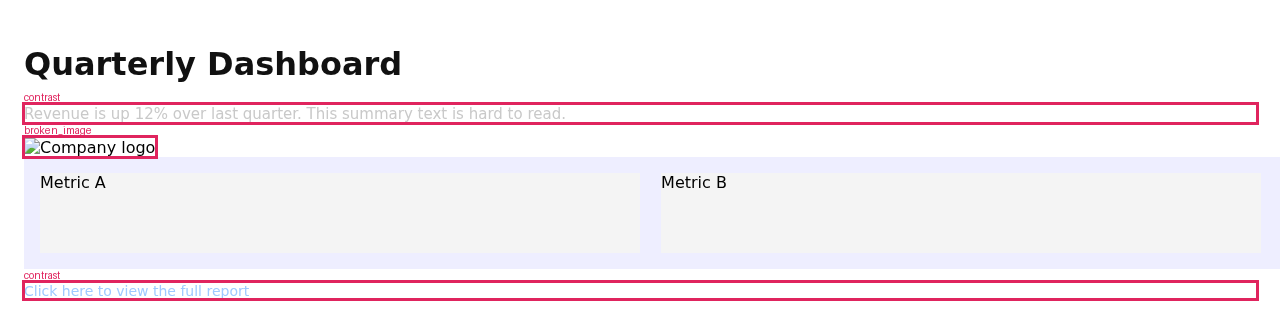
That produces a FAIL report (this is the actual output):
  FAIL  (local)
  Heuristic structural analysis (no semantic critique): found 4 issue(s).

  • [contrast] Low contrast (ratio 1.66, needs 4.5 for AA) on text 'Revenue is up 12%…' @(24,105) (dom/high)
  • [contrast] Low contrast (ratio 1.70, needs 4.5 for AA) on text 'Click here to view the full report' @(24,283) (dom/high)
  • [overflow] Page content overflows horizontally by 976px (causes a horizontal scrollbar). (dom/high)
  • [broken_image] Broken image (failed to load): missing-logo.png @(24,138) (dom/high)
The agent fixes the source and looks again — now PASS, with a "what changed" diff:
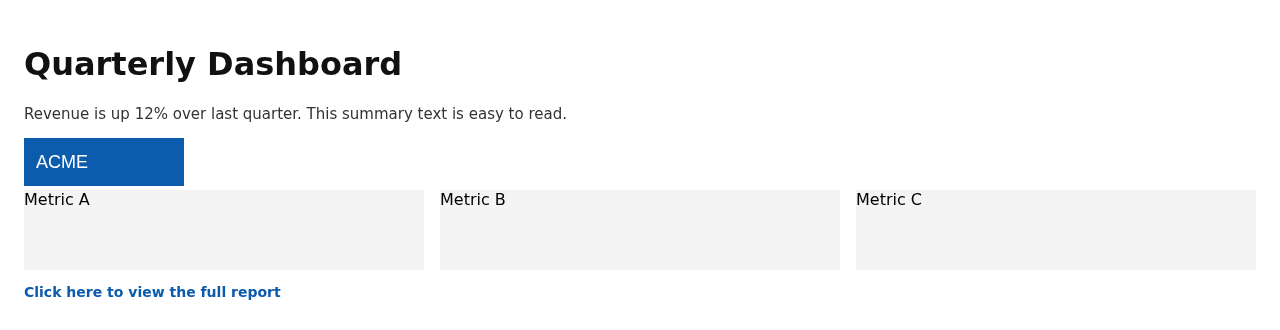
  PASS  (local)
  Structural checks passed (no DOM/CV defects detected).

   what changed: Moderate visual change (SSIM 0.972); 12 region(s) differ.

✓ The agent SAW the problems and fixed them — FAIL → PASS.
That FAIL → PASS arc, in ~60 seconds with no key, is the product.
Everyday use
agentvision check  ./index.html --json          # structural checks, no key
agentvision analyze ./index.html --backend anthropic   # + semantic critique (needs key)
agentvision loop   ./index.html --max-iter 3
agentvision sheet  ./index.html
agentvision baseline ./index.html --name home && agentvision regress ./index.html --name home
Set a key to enable semantic analysis:
Running securely (production)
AgentVision renders untrusted HTML/URLs, so it's hardened by default (SSRF blocked incl. DNS-rebinding via a vetting egress proxy, Chromium sandbox on, image-bomb caps). For a networked deployment, add these belt-and-suspenders:
- Restrict the renderer's egress to a network that denies outbound to
169.254.0.0/16(metadata), RFC-1918, and CGNAT — a defense-in-depth backstop around the app controls. - Containerize so the Chromium OS sandbox is available without
--no-sandbox. - REST service: it stays loopback-only with zero config; to expose it, set
AGENTVISION_API_TOKEN(binding a routable host without one is refused) and front it with TLS. - Keep
block_private_networkson (default); only use--allow-localagainst trusted targets.
Full threat model and the complete control list: SECURITY.md.